
While shopping for an ink tank printer, there are a few factors that you should consider. These factors will help you buy the best ink tank printer for your work.
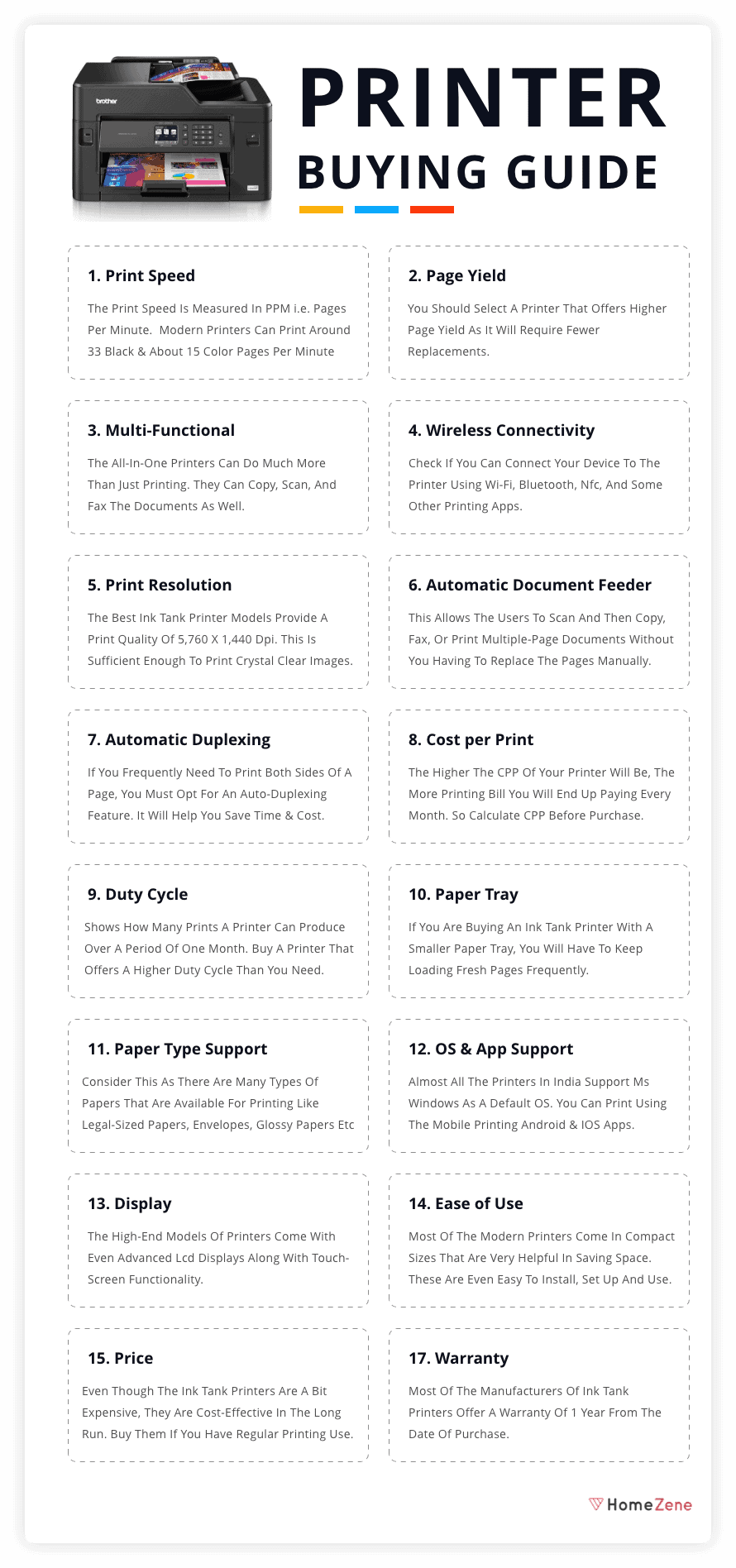
Table of Contents
1. Print Speed:
If you are planning to buy an ink tank printer for either your shop or office use, you must know that the print speed is one of the most important pointers that you should consider.
The print speed is mentioned in PPM i.e. pages per minute. Most of the printers offer a PPM rating for both black and colored documents. You can find the print speed measurement in the technical specifications of the printer.
Some of the advanced and modern models of printer can print around 33 black and white pages per minute and about 15 color pages per minute. Thus, once you are clear with the intention of buying the printer and how are you going to use it, you should choose the printer and the specifications accordingly.
2. Page Yield:
Page yield defines the total number of pages that a full ink tank can print. This measurement helps in giving you a clear understanding of how often you will have to refill the ink. You should select a printer that offers higher page yield as it will require fewer replacements. This will help in saving both – your efforts and time.
Generally, an ink printer can print around 6,000 – 7,000 pages per tank filling. There are a few models that offer even higher yields. So, you can select one as per your requirements.
3. Multi-Functional (Print, Scan, Fax, & Copy):
If your job requires a frequent need where documents need to be scanned and faxed, a normal printer would not be sufficient in this situation. You will have to look for a multifunctional printer so that all the work can be done at a place.
The All-in-One printers can do much more than just printing. They can copy, scan, and fax the documents as well. Even though they are a bit expensive than normal printers, they offer multiple useful functions. Thus, it is worth spending extra bucks on these types of multifunctional printers.
4. Wireless Connectivity:
Almost all the models of printers provide a wired connectivity option using USB ports. There are a few models that even allow wireless connectivity where you can connect your device to the printer using Wi-Fi, Bluetooth, NFC, and some other printing apps.
This option helps you in printing the document from your smartphone or tablet apart from only PC. It also gives you the flexibility of installing the printer wherever you wish to, without worrying about the restriction due to the wired connection.
In addition to the Wi-Fi connectivity, some printers even offer USB 2.0 or USB 3.0 options. These can be useful options too, especially for those who have shops that offer printing services. One thing that you must keep in mind is that wireless printers are more expensive than wired printers but they are useful at the same time.
5. Print Resolution:
The print resolution factor is exceptionally important for those users who print color images or photos (like Photographers and Digital Artists). You should look for a model that provides optimal resolution prints that can avoid pixelated and unclear images.
Most of the ink tank printers provide good print qualities. They are far better than the quality that you get from a printer with a cartridge. So, if you work more with the color images, don’t forget to check the product description.
The best ink tank printer models are those that provide a print quality of around 5,760 x 1,440 DPI. This is sufficient enough to print crystal clear images.
6. Automatic Document Feeder (ADF):
ADF is a useful feature where the printer takes several pages at once and then feeds the papers – one page at a time to the copier or scanner. This allows the users to scan and then copy, fax, or print multiple-page documents without you having to replace the pages manually. Most of the copiers even allow scanning on the flatbed or platen (the “glass”) or via a document feeder.
The automatic document feeder generally has a maximum capacity of about 20 to 30 pages. This helps in minimizing your workload to a large extent.
There are 2 types of ADFs that allow duplex scanning. They are:
Reverse automatic document feeders (RADF): They scan one side of the page and then flip over the page allowing the other side to be scanned.
Duplexing automatic document feeders (DADF): They scan both sides of the page at one go.
7. Automatic Duplexing:
If you frequently face a need to print both sides of a page, you must opt for an auto-duplexing feature. With the help of the Auto-Duplex feature, the printer prints on both the sides of the pages automatically without your involvement to turn the pages. It not only helps you save your time but is also helpful in saving cost as you are going to utilize both sides of the paper.
8. Cost per Print:
CPP or cost per print determines the cost of printing one page with your choice of printer’s ink. The CPP also helps in determining the recurring cost of the printer.
Calculating the cost per print is quite simple. All you have to do is divide the printer ink price with the page yield for the individual colors and then add up the results. The higher the CPP of your printer will be, the more printing bill you will end up paying every month.
9. Duty Cycle:
The duty cycle means the absolute number of pages that can be printed every month at the rated print quality of the printer. You can also define the duty cycle as the measurement that shows how many prints a printer can produce over a period of one month without any jams or errors. For hassle-free operation, buy a printer that offers a monthly duty cycle that is beyond your needs.
10. Paper Tray:
The size of the paper tray is one of those features that most people tend to ignore. However, it is an equally important feature that helps in determining the efficiency of the printer. If you are buying an ink tank printer with a smaller paper tray, you will have to keep loading fresh pages frequently. If you print a large volume of copies every day, it might look like a repetitive and redundant task after a while to load the pages.
To solve this, some models of printers even come with a second paper tray. It prevents you from the manual workload of refilling the paper tray every few hours. Instead, the secondary paper tray provides an adequate supply of paper whenever you need any extra paper/papers.
11. Paper Type Support:
While most people work with only the standard A4 size papers, others don’t. If you fall under the second category where you don’t use only the A4 size papers, you must check the types of papers that a printer supports beforehand.
There are many types of papers that are available for printing like legal-sized papers, envelopes, glossy papers, and many more.
The size of the feeding tray of the printer should be accurate so that it can support different types of sheets without any difficulty. If the printer that you bought supports non-standard papers, you can continue the printing process by mentioning the paper size in the print screen option.
12. Operating System Support:
Another significant factor that you should check before buying the printer is whether it supports the operating system of the device that you own or not. Generally, the printers offer support to all the OS versions that are one year older than the current version released in the market. To know more about it, you can even check the brand’s website and check what all versions of the operating systems are supported by that particular model of the printer.
Almost all the printers in India support MS Windows as a default OS. However, if you use other operating systems as well like Linux or macOS, you must check with the manufacturer before only.
13. App Support:
It becomes quite easy to print the documents using either your smartphone or tablet. You can do so by using the mobile printing apps that are supported by both Android software and iOS. Using these apps, you can transfer the documents to the printer, provided that both the devices (phone and printed) share the same Wi-Fi connectivity.
Even though the wireless printers are quite expensive, it becomes very easy to connect the printer to the And